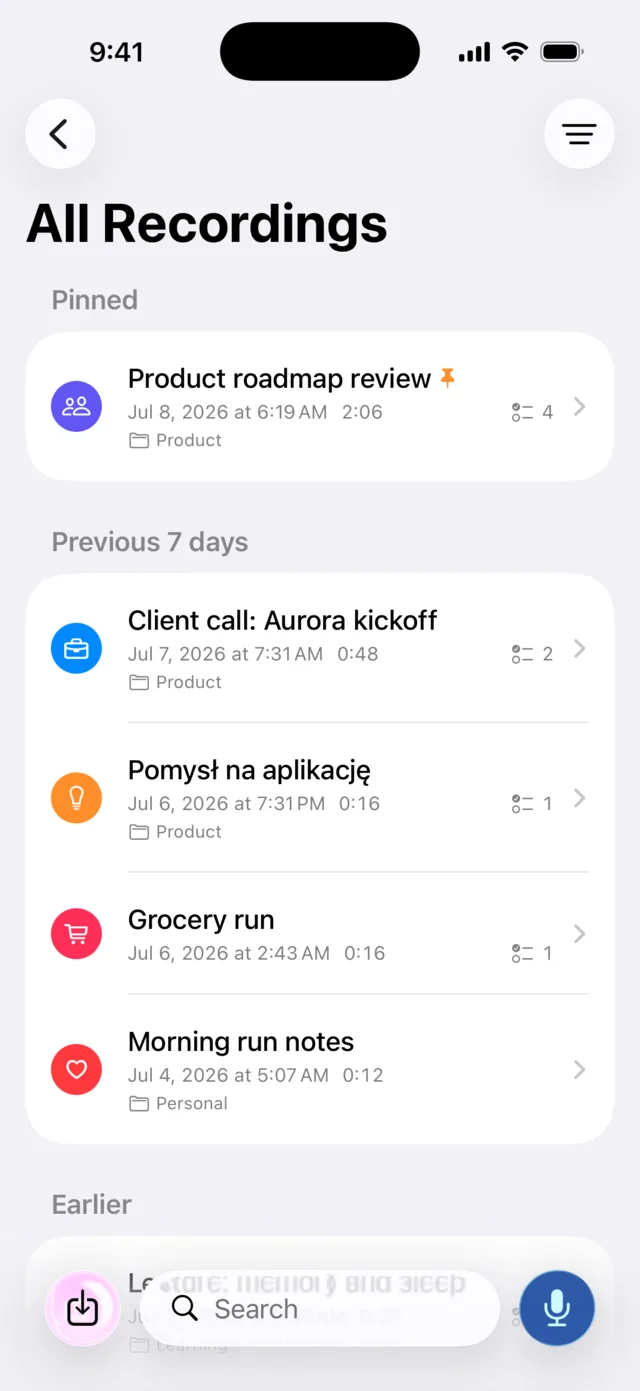
From voice to done in three steps
One tap to record. A few seconds later you have text you can search, share and act on.
Record or import
Tap the mic and talk, or import an existing audio file. Watch the live transcript grow as you speak.
Murble does the reading
The AI on your device writes the transcript, a summary in your style, finds the action items and files the note into a category. No server involved.
Act on it
Check tasks off, send them to Reminders, ask the note questions, export a report, or just search for any spoken word later.
Recorder, transcriber, translator and assistant in one
Your content is processed on the device. After required model downloads, the core workflow keeps working offline. Recording, live transcription, summaries, tasks, speaker labels and the transcript tools are free with no limits; the Pro badge marks the five paid extras.
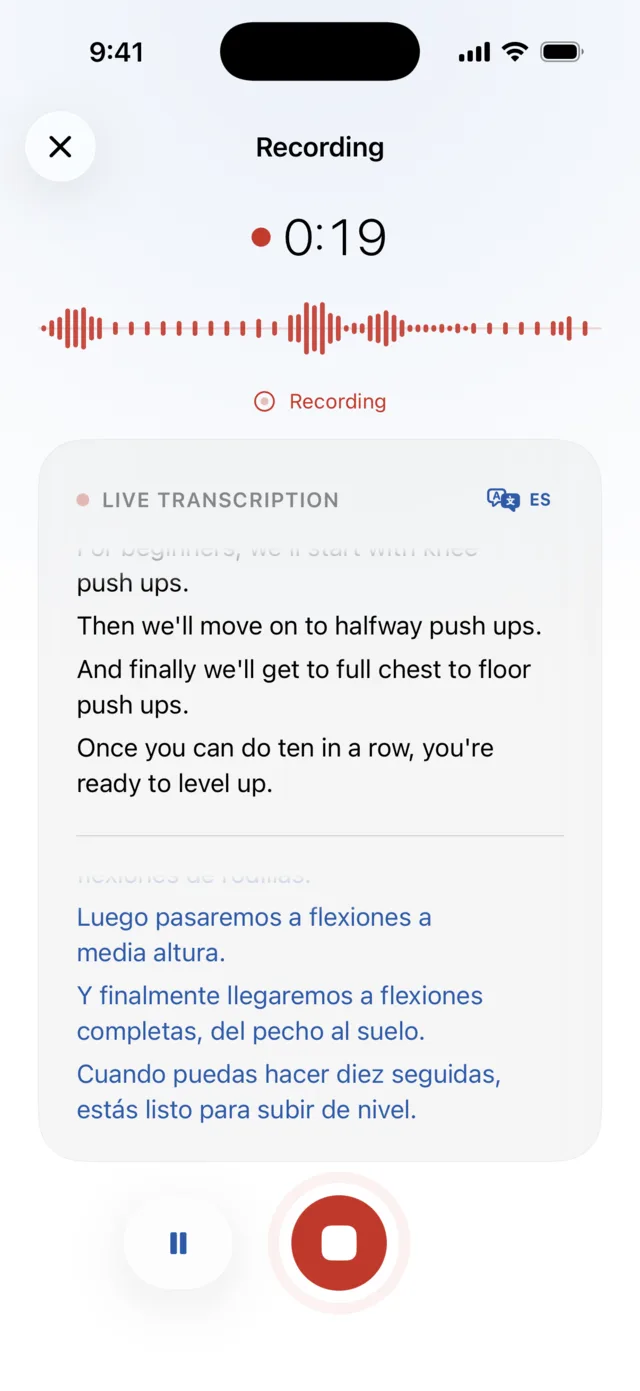
See your words as you say them, in two languages
The transcript appears live while you record. Turn on live translation PRO and every sentence is translated into any of 20 languages as you speak, right under the original.
- Works during meetings, lectures and interviews
- Pause and resume without losing a word
- Apple speech and translation process content on the device
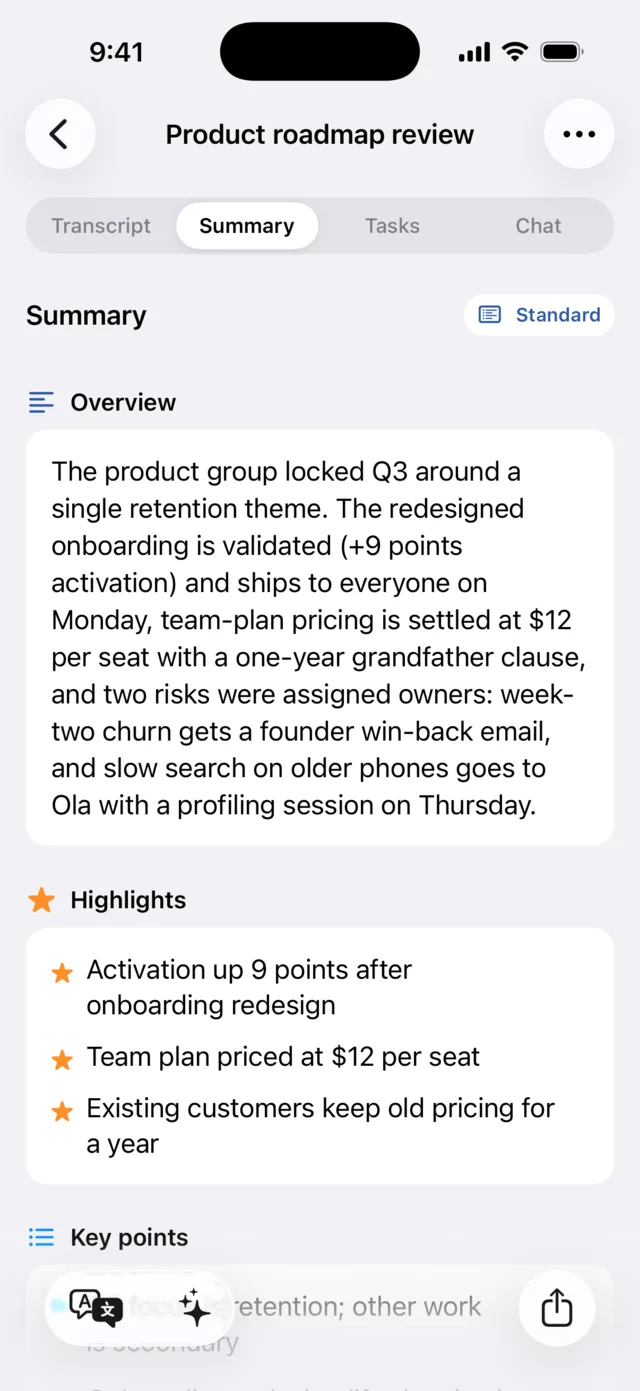
The gist, the highlights and the key points
Murble writes an overview, stars the highlights and lists the key points. On iOS it uses Apple Intelligence or a local model you download, so summaries can work offline and the recording stays on your device.
- Four styles: brief, standard, detailed or action plan
- Summaries in the language you choose
- Free, for every note, with no monthly cap
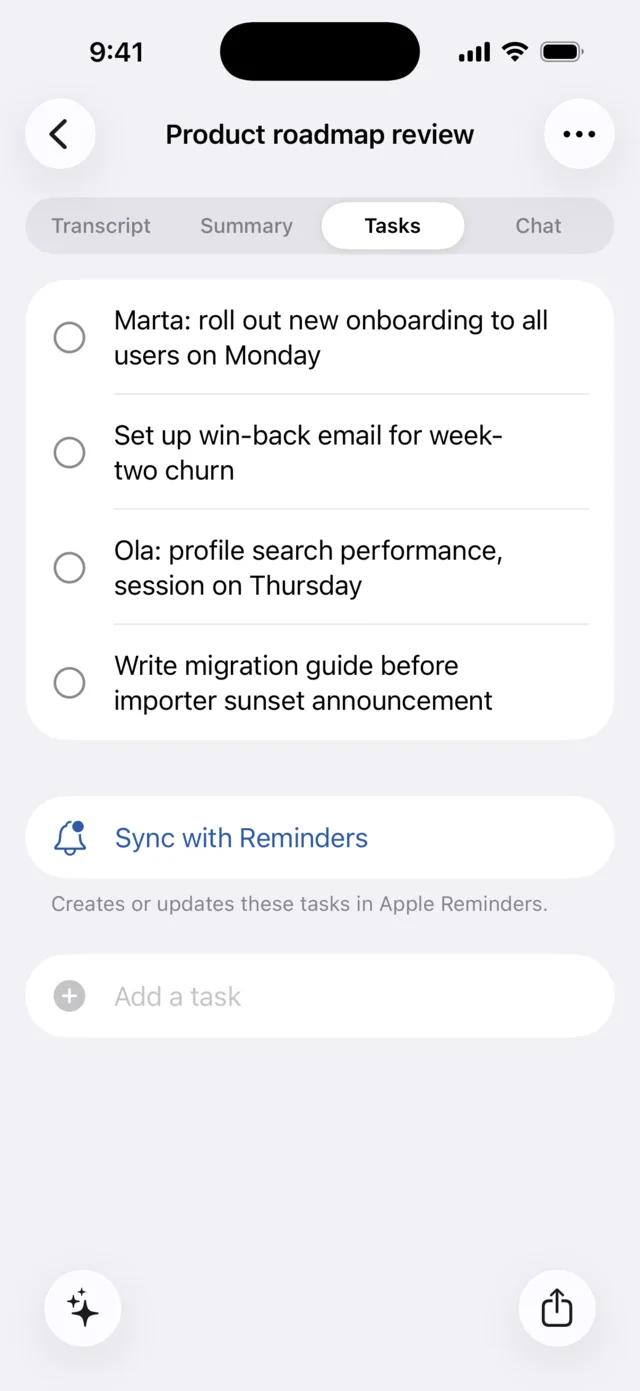
Your to-dos find themselves
Every "Marta will send the mockups on Friday" becomes a checkable task, automatically. One tap sends the whole list to Apple Reminders and keeps completion in sync.
- Detected from the recording, no tagging needed
- Add your own tasks to any note
- Two-way sync with Apple Reminders PRO
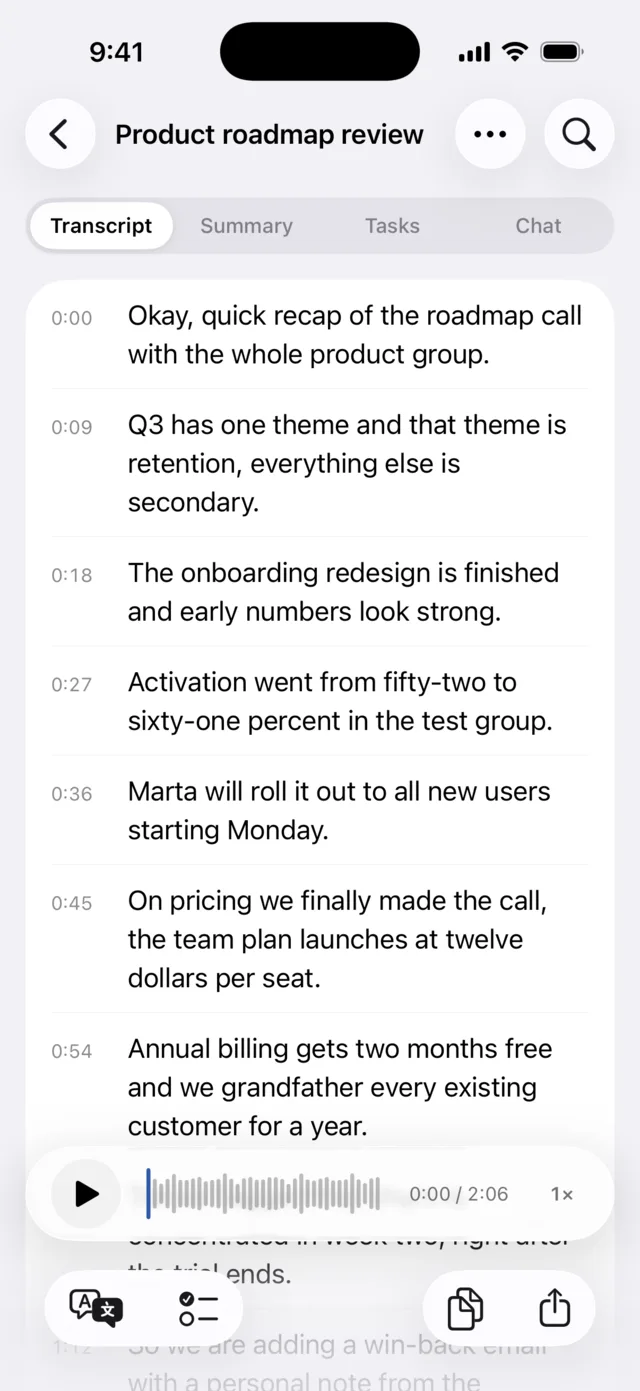
A transcript you can play, edit and clip
Every sentence is time-aligned. Tap a line to jump the audio there, fix a word inline, or select a passage and share it as text, or as an audio clip. In conversations, anonymous speaker labels show who said what.
- Tap-to-seek playback with highlighted current line
- Anonymous speaker labels you can rename, merge or split
- Full-text search across every note
- Share any fragment as an m4a audio clip
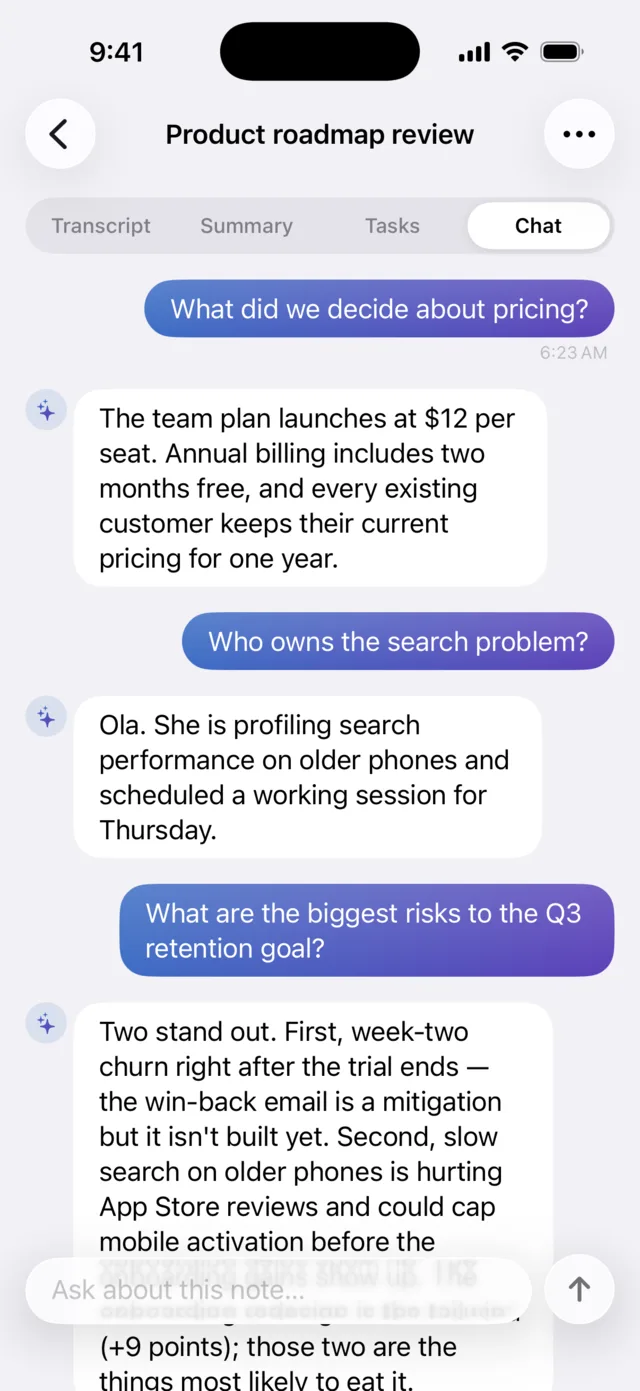
"What did we decide about pricing?"
Ask your recording a question and get an answer based on what was actually said. The chat model processes your question on the device and can work offline after it is downloaded.
- Answers stick to the content of the note
- Suggested questions to get you started
- No connection needed, even for the AI
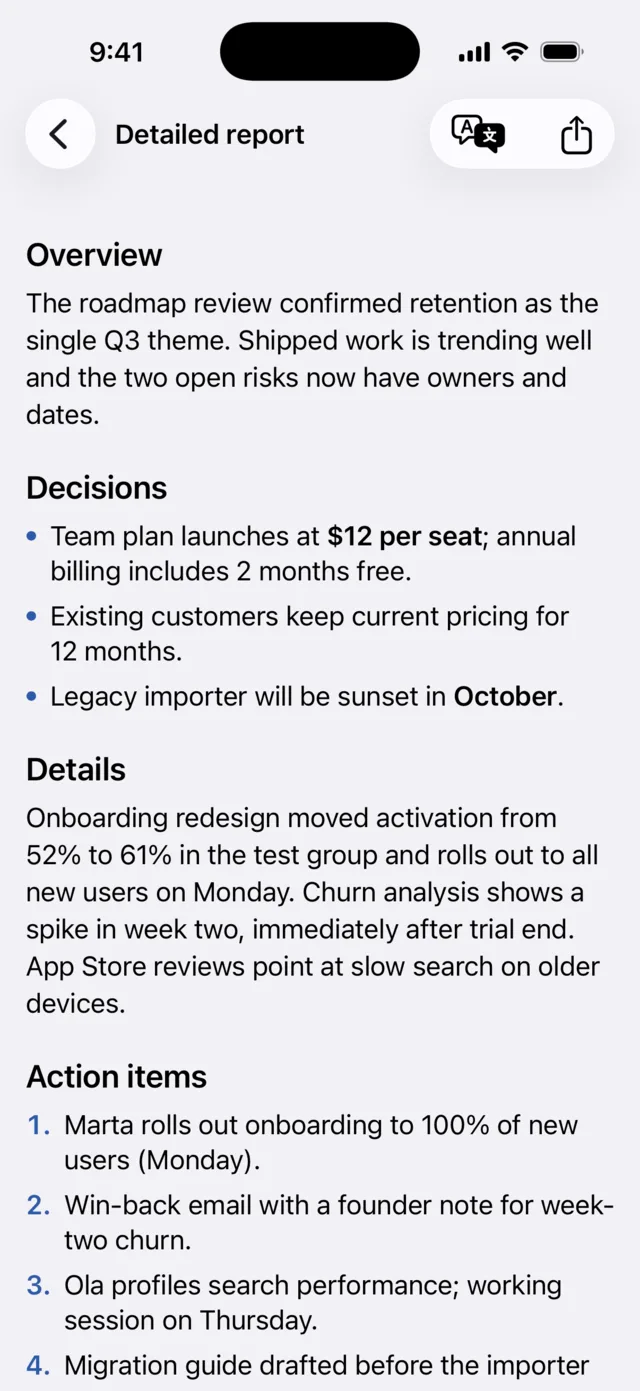
From a recording to meeting minutes
Turn a recording into a structured write-up: overview, decisions, details, action items and next steps. Generated on the phone, offline, and ready to drop into an email or a wiki.
- Multi-section, professionally structured
- Export as PDF, Markdown, RTF and more
- Regenerate any time as the note evolves
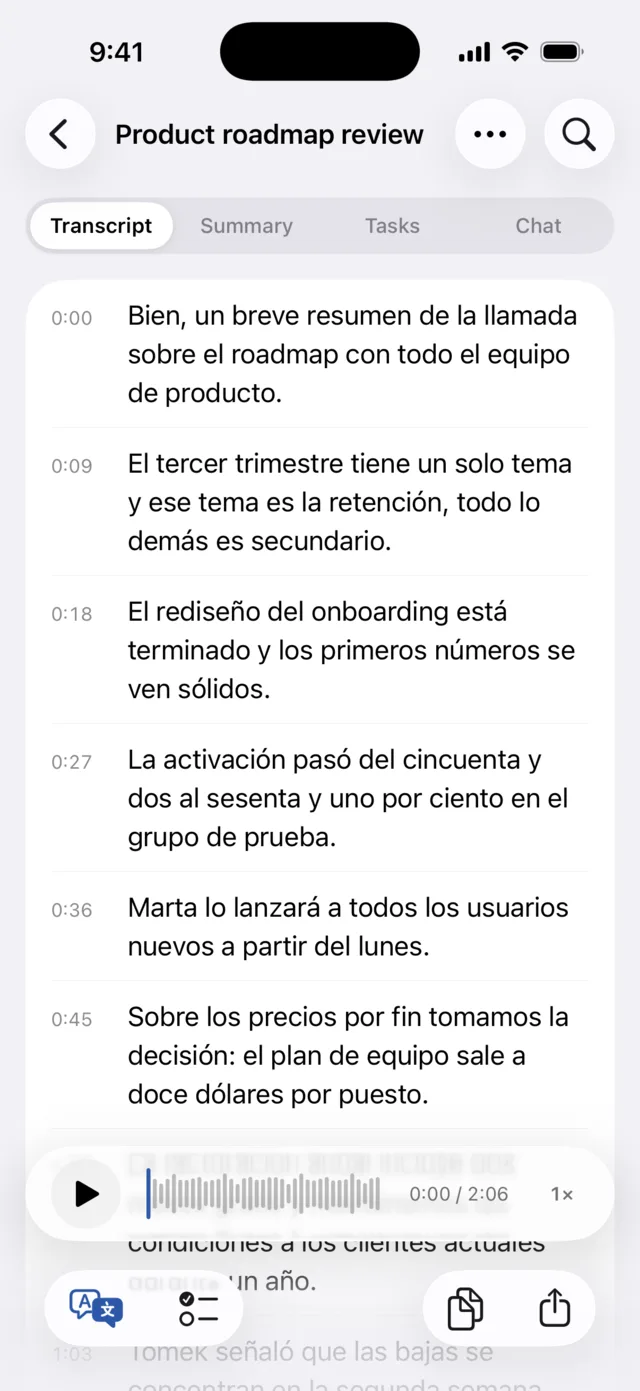
Your notes, in 20 languages
Translate a transcript or a summary and keep the timestamps, so the translated text still follows the audio. Useful for multilingual teams, classes and travel.
- Sentence-by-sentence, aligned to the recording
- Apple Translation on the device, with offline use after its language assets are available
- Original and translation one tap apart
The rest of the toolbox
Smaller features you'll end up using every day.
Whisper on board
Need another language? Download an offline Whisper model and choose the balance of speed and accuracy that suits your device. Model downloads continue in the background and resume after a relaunch.
AI categories
Notes sort themselves into Work, Meetings, Ideas, Shopping, Health and more. You add folders and pins on top.
Export anywhere
PDF, Markdown, RTF, plain text, JSON, plus SRT or VTT subtitles for video work. Import audio files, too.
Face ID lock on iOS
Lock the whole app behind Face ID. Optionally auto-delete audio after transcription: keep the words, drop the voice.
Private iCloud sync on Apple devices PRO
Your notes on every device, stored only in your personal iCloud database. Murble has no content processing server.
A 30-day safety net
Recently Deleted keeps notes for up to 30 days. Long recordings keep transcribing inside the app while you read other notes.
Find the note you were thinking of
A hundred notes behave nothing like ten. Everything below is about getting back to the one you want, and about the recordings you keep returning to.
One View menu
Sort by newest, oldest, longest or name, and stack filters that combine: has a summary, has audio, a language, a date range. The toolbar did not grow a single button, the old filter control simply became the menu.
Smart folders
Save the view you just configured and it keeps itself current. New notes that match show up on their own, and nothing is copied or moved out of place.
Several notes at once
Touch and hold a note to start selecting, then pin, move to a folder or delete the whole set in one action instead of one by one.
Search reaches further
Summaries, action items, speaker labels and folder names are searched too, and every result says which of them it matched, so a hit is never a mystery.
Mark the moment
One tap while recording drops a marker. It lands as a line of the transcript, takes you back to that second, and travels into your exports.
Add to a recording
A conversation that resumes can join the note it belongs to instead of becoming a second one. The transcript, markers and speaker labels you already had keep their place.
Storage you can see
A Storage screen shows exactly what your recordings take up, and can clear audio older than a period you choose while the notes stay.
Sync on your terms PRO
Choose whether sync carries your recordings. Turn the audio off and your devices share the notes, transcripts and summaries while the files stay where they were made.
Capture ideas from anywhere
Murble connects with the Apple tools you already use while keeping content processing private.
Voice notes and text notes
Record what you hear or write an idea directly. Both live in one searchable, organized library.
Share into Murble
Send selected text, links or supported audio from another app. Murble saves it as a durable note for later processing.
Siri, Shortcuts and Action button
Start a recording or create a note with your voice, an automation or a supported hardware action.
Widgets and Control Center
Keep recording controls on the Home Screen, Lock Screen or in Control Center so capture is always close.
A Live Activity while it works
Transcription and summaries report how far along they are on the Lock Screen and in the Dynamic Island, so you can put the phone down without wondering.
Optional private Spotlight
Choose whether note titles and safe previews appear in system search. You can disable indexing and remove it at any time.
Meeting mode
With permission, Murble can use a nearby calendar event title and time locally to organize a recording.
Anonymous speaker labels
On device diarization separates voices without identifying people. Provisional labels can appear live while you record, and the final pass refines them after transcription. Rename, merge or split labels when a conversation needs a correction.
Your notes on phones and tablets
Murble is available for iPhone, iPad, Apple silicon Macs, and Android phones and tablets. Optional sync uses private iCloud on Apple devices and private Google Drive app data on Android. The two libraries stay separate.
More room, same privacy
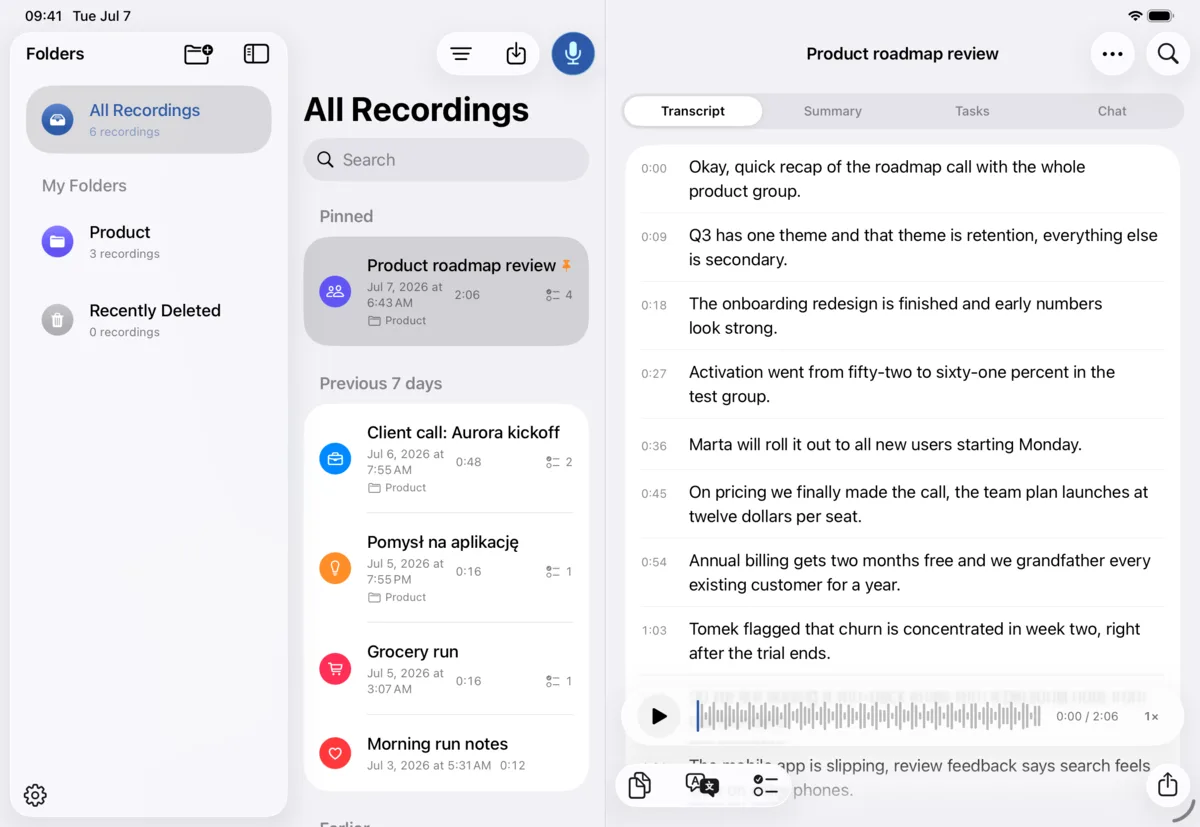
On iPad the library opens into a multi-column layout: folders, notes and the transcript side by side. On a Mac with Apple silicon you install the same app from the Mac App Store.
- Multi-column split view on iPad
- Drag a note straight onto a folder
- Keyboard shortcuts for recording, search and the detail tabs
- Runs on Apple silicon Macs
- Private iCloud sync PRO keeps your Apple devices current
- Offline and on-device on every platform
Why Murble?
Most AI voice apps upload your audio to a server and rent the result back to you. Murble doesn't have a server.
Privacy by architecture, not by policy
Transcription and AI process your recordings on your device, on iOS and Android. Murble has no content processing server. Optional private sync and sharing send only the content you choose.
The core is free. Really free.
Unlimited recording, unlimited transcription, unlimited AI summaries. No monthly minutes, no note caps, no watermarks. Pro adds power features, not the basics.
Pro costs less than one month elsewhere
A year of Murble Pro costs about as much as a single month of the popular cloud alternatives, or grab lifetime for $59.99 and never think about it again.
Ready when the network is not
Once required speech, language and AI models are installed, recording, transcription, summaries, reports, chat and translation can work without a connection.
Open the app, start talking
Start recording without a Murble account. iOS has no analytics SDKs. Android uses Google services that process technical diagnostics, as explained in the privacy policy. Neither version has advertising tracking.
Native on iOS and Android
Murble is built for each platform. The iOS edition uses Liquid Glass, Apple Intelligence, Reminders, iCloud and Face ID. Android brings local transcription and AI, an adaptive tablet layout and optional private Google Drive sync.
A private alternative to Voicenotes, Otter.ai and AudioPen
Murble vs Voicenotes, Otter.ai, Whisper Memos and AudioPen: pricing and features side by side.
 Murble Murble |
Voicenotes | Otter.ai | Whisper Memos | AudioPen | |
|---|---|---|---|---|---|
| Full-feature pricecheapest plan with all features | $19.99per year | $9per user/month, no annual plan | $99.96per year (Pro) | $60per year | $99per year |
| Lifetime purchase | ✓$59.99 once | ✗not offered | ✗ | ✗ | ✗ |
| Free tierrecording & transcription | Unlimitedincl. AI summaries | 100 min/week30-day history | 300 min/mo1 200 min/mo on Pro | Not published | Limitedlimits not published |
| Works fully offline | ✓ | ✗ | ✗ | ✗ | ✗ |
| Processing stays on device | ✓speech + AI + translation | ✗cloud | ✗cloud | ✗cloud (OpenAI et al.) | ✗cloud |
| No account required | ✓ | ✗ | ✗ | App Store only | ✗ |
| AI summaries | ✓free | ✓ | ✓meeting-focused | Summariesno task extraction | Rewritespolished text |
| Speaker labels | ✓anonymous labels, on device | ✗ | ✓cloud | ✗ | ✗ |
| Chat with your notes | ✓on device | ✓cloud | ✓cloud | ✗ | ✗ |
| Live translation while recording | ✓20 languages | ✗ | ✗ | ✗ | ✗ |
| Tasks → Apple Reminders | ✓two-way completion | Via export | ✗ | ✗ | ✗ |
| Export formats | 7PDF, MD, RTF, TXT, JSON, SRT, VTT | Basic+ integrations | TXT, PDF, SRTsome Pro-only | Via integrations | Text |
| Recording length limit | None | Not published | 90 minper meeting (Pro) | Nonepaid plan | 15 minpaid plan |
| Analytics / tracking | iOS: no analytics SDKsAndroid: technical diagnostics No advertising tracking |
✗ | ✗ | Minimal | Minimal |
Based on each product's public pricing and feature pages, verified 25 July 2026. Cloud services may offer features not listed here (e.g. meeting-bot integrations); the comparison focuses on personal voice notes. Read the full comparison, with every competitor fact dated and sourced, plus where Murble loses. Found an error? Tell us and we'll fix it.
Read before you install anything
Longer pieces on the questions people ask before trusting an app with their voice, each with the real steps in Murble and the limitations stated plainly.
Voice notes app comparison
Murble, Voicenotes, Otter.ai, Whisper Memos and AudioPen on processing, offline behaviour, accounts and price. Dated, sourced, and honest about where Murble loses.
What makes a voice notes app private
A six question checklist you can run on any app in ten minutes, and how Murble answers each one.
Offline transcription on iPhone
Install a speech model once, then get a transcript with the radios off. Which size to pick and what accuracy costs.
Voice memos to text
Import a recording you already have, correct the transcript, then export it as PDF, Markdown, SRT and more.
On device AI note taking
How a recording becomes a summary, an action item list and a structured report using only your phone.
Your content is processed on your device
Not merely encrypted in transit. Your recording content is processed on the device at every stage:
No Murble account. Biometric lock. Private processing, with optional cloud sync. Android Google services process technical diagnostics; see the privacy policy.
Simple pricing
The core app is free forever on iOS and Android. The feature list and USD prices here describe the iOS edition. Google Play shows the current Android offer.
Free
Everything you need to capture notes and read them back.
- Unlimited recording & on-device transcription
- Live transcription preview while you speak
- AI summaries in four styles
- Action items: detected automatically, add your own, check off
- Search, folders, AI categories & pins
- Export to PDF, Markdown, RTF, TXT, JSON, SRT, VTT
- Face ID lock & optional audio auto-delete
$0. No caps, no trial, no card.
Murble Pro
Everything in Free, plus the five power features:
- Apple Reminders sync: send your to-dos to Reminders with one tap, completion syncs back
- Chat with your notes: ask questions, get answers grounded in the recording, offline
- Detailed reports: structured minutes with decisions and next steps, ready to export
- Translations: transcripts, summaries and live translation while recording, 20 languages
- Private iCloud sync: your notes on every device, only in your personal iCloud
From $2.99/month, or $59.99 once, yours forever.
The features and USD prices below describe the iOS edition. Android uses Google Drive for optional sync. Each store shows its current local price and any trial before purchase. Pro purchases are separate for each platform.
Common questions
The things people ask before trusting an app with their voice.
Is Murble available for Android?
Yes. Murble is available on Google Play for Android phones and tablets. It offers local transcription and AI processing, an adaptive tablet layout and optional private Google Drive sync. The screenshots and Apple integrations on this page show the current iOS edition. Google Drive and iCloud libraries are separate, and purchases do not transfer between stores. See the Android privacy policy and support page for details.
Does Murble work offline?
Your recordings and their content are processed on the device. Recording, transcription, summaries, action items, reports, chat and translations can work offline after any required speech, language or AI model has been downloaded. Model downloads, optional iCloud or Google Drive sync, purchases and some system services require a connection.
Does my audio really never leave the phone?
Your audio stays on the device for transcription and AI processing. If you enable cloud sync, selected content is uploaded to your private iCloud on Apple devices or private Google Drive app data on Android. Exporting or sharing sends the content you choose to its selected destination. Android Google SDKs also process technical diagnostics, as explained in the privacy policy.
Which languages can Murble transcribe?
On iOS, Murble supports languages available through Apple on device speech recognition and dozens more through a downloadable Whisper model, including automatic language detection. Summaries can use the recording language or a language you choose.
Can Murble tell speakers apart?
Yes. Murble can add anonymous Speaker 1, Speaker 2 and similar labels during supported live recordings and after transcription. This is private on device speaker diarization, not voice identity recognition. You can rename, merge and correct labels.
How does Murble fit into iPhone workflows?
You can start recordings with Siri, Shortcuts, the Action button, Control Center, Home Screen and Lock Screen widgets. The Share Extension saves selected text or imported audio. Optional private Spotlight indexing helps you find notes from system search.
Does meeting mode upload my calendar?
With permission, Meeting Mode reads a relevant event title and time locally. If that title is saved as the note title, it becomes part of the note and is synced when you enable optional cloud sync. Murble does not run a calendar processing server.
How will I know when processing finishes?
While Murble is open, a private banner tells you when a transcript, summary or report is ready and can open it directly. When the app is in the background, Murble can use a local notification if you allow notifications. Neither message contains your note title or content.
Do I need the newest iPhone for the AI features?
No. On devices with Apple Intelligence, Murble can use it. On older supported devices you can download a compact local model selected for the available memory, or use transcription without a summary model.
What happens to my notes if I don't subscribe?
Nothing. Your notes remain on your device. Recording, transcription, summaries, search and export stay free. If Pro lapses, Pro extras become unavailable, while existing content and local tasks remain accessible.
Can I get my data out?
Any time. Export notes or reports as PDF, Markdown, RTF, plain text, JSON, SRT or VTT. You can also share audio clips and copy text.